

 Penelope Iroko
 Table of Contents
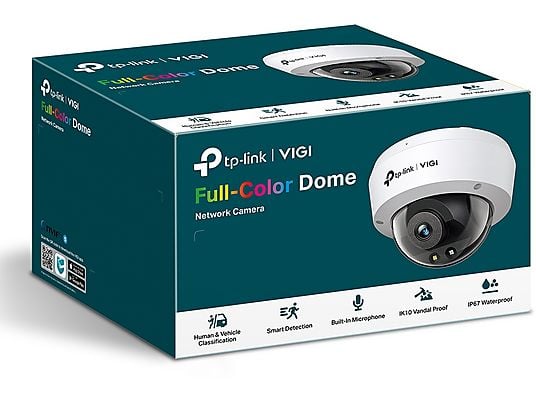
TP-Link vulnerability patch fixes a critical VIGI camera issue tracked as CVE-2024-11741. Unpatched systems risk unauthorized access to video streams and device controls.
SecurityWeek reported that TP-Link released updated firmware to address the vulnerability. The company’s fix blocks attacker pathways that could expose camera feeds or alter configurations.
Administrators should deploy the TP-Link vulnerability patch immediately and verify every device is running the latest firmware build.
Category: IoT Security
TP-Link vulnerability patch: What You Need to Know
- Update VIGI cameras now—the CVE-2024-11741 exploit is fixed, preventing unauthorized access and configuration tampering.
- Bitdefender — Endpoint protection to block exploits and malware pivoting from IoT.
- 1Password — Enforce strong, unique credentials for camera admin accounts.
- Passpack — Shared password management for distributed camera fleets.
- Tenable — Discover and assess exposed devices and firmware risks.
- Tenable OT/IoT — Visibility and vulnerability scanning across IoT networks.
- Auvik — Network monitoring to detect anomalous camera traffic.
- IDrive — Secure backups for NVRs and critical configs.
- Tresorit — Encrypted cloud storage for surveillance exports.
What CVE-2024-11741 Means for VIGI Users
TP-Link’s firmware update closes a VIGI camera security flaw that could expose live feeds or allow configuration changes. The vendor’s release mitigates the CVE-2024-11741 exploit path reported through coordinated disclosure.
Unpatched devices, especially those internet-reachable or using weak credentials, are at heightened risk.
Organizations face privacy violations, surveillance gaps, and compliance exposure if cameras remain vulnerable. Home users risk unwanted access to live video and device settings. Applying the TP-Link vulnerability patch reduces these risks immediately.
How attackers could use the CVE-2024-11741 exploit
Attackers typically scan for internet-exposed cameras, probe for known flaws, and test default or weak passwords. The CVE-2024-11741 exploit reinforces the need for timely patching, segmentation, and least-privilege access.
Even non-internet-facing devices can be compromised through lateral movement. A rapid TP-Link vulnerability patch provides an essential first layer of defense.
Affected devices and versions
The vulnerability impacts TP-Link VIGI camera models listed in TP-Link’s advisory. If you manage multiple models or mixed firmware, treat every unit as exposed until confirmed updated.
Apply the TP-Link vulnerability patch to each camera and recorder; do not assume a single-model update covers all devices.
TP-Link vulnerability patch release details
TP-Link issued updated firmware that blocks the CVE-2024-11741 exploit. Administrators should:
- Sign in to the VIGI app or web interface and check for firmware updates.
- Apply the TP-Link vulnerability patch on every camera and any NVR in scope.
- Reboot devices and verify firmware build numbers match the latest release notes.
For remote sites, schedule maintenance windows to ensure successful updates. Maintain records of device, location, firmware version, and update date to demonstrate compliance.
Verification and mitigations
After installing the TP-Link vulnerability patch, revalidate remote access rules, passwords, and streaming settings.
If immediate patching is not feasible, reduce exposure by isolating cameras on a VLAN, disabling unnecessary remote access, enforcing strong unique credentials, and restricting management via a hardened jump host. These steps lower near-term risk but do not replace the patch.
Coordinated disclosure and timeline
According to the report, TP-Link acknowledged the issue and released fixes as part of a standard coordinated disclosure process. The TP-Link vulnerability patch now provides a definitive remediation path for the VIGI camera security flaw.
Security context and IoT camera best practices
Camera vulnerabilities are common across vendors, underscoring the need for prompt updates and layered defenses. For context, see this critical Edimax camera zero-day case, where rapid patching and hardening were essential.
Broader ecosystems show similar urgency: review Apple’s security patches and Microsoft’s exploited zero-day fixes for patch cadence trends.
Combine the TP-Link vulnerability patch with these measures:
- Restrict management interfaces to internal networks or VPNs.
- Enforce strong, unique passwords and enable MFA where supported.
- Segment camera networks away from business systems and the internet.
- Monitor logs and traffic for anomalies and repeated login attempts.
- Maintain a tested rollback and incident response plan.
Implications for Security and Operations
Applying the TP-Link vulnerability patch quickly closes a known attack vector, reducing risks of privacy breaches, stream manipulation, and evidence tampering. It also demonstrates due diligence for regulated environments where video integrity is critical.
The trade-off is operational effort: coordinating maintenance windows, validating versions, and managing distributed updates. Short, planned downtime is typically far less costly than incident recovery if a CVE-2024-11741 exploit is weaponized at scale.
- Bitdefender — Shield endpoints used to administer cameras and NVRs.
- 1Password — Centralize secrets and rotate credentials safely.
- Passpack — Shared access with audit trails for admin teams.
- Tenable — Identify vulnerable firmware and exposed services.
- Tenable OT/IoT — Deep visibility into IoT assets and risks.
- Auvik — Detect unusual network behavior from compromised devices.
- IDrive — Backup critical footage and configs against ransomware.
- Tresorit — Secure, compliant storage for exported video.
Conclusion
TP-Link delivered a direct fix for VIGI customers. Apply the TP-Link vulnerability patch across all cameras and recorders without delay.
Confirm every device is updated, recheck access controls, and monitor for anomalies. Maintain segmentation and strong credentials to limit blast radius.
The combination of rapid patching, hardened configurations, and vigilant monitoring offers the best defense against the VIGI camera security flaw and any resurgence of the CVE-2024-11741 exploit.
Questions Worth Answering
Which TP-Link products are affected?
- VIGI camera models listed in TP-Link’s advisory; verify each device and apply the TP-Link vulnerability patch.
What does CVE-2024-11741 enable?
- Unpatched systems could allow access to video streams or configuration changes; the TP-Link vulnerability patch blocks this vector.
How do I install the fix?
- Use the VIGI app or web interface, apply updates per device, reboot, and confirm the new firmware build.
Are mitigations enough without patching?
- No. Segmentation and strong credentials reduce risk, but the TP-Link vulnerability patch is the definitive remediation.
Is there evidence of active exploitation?
- No public evidence was cited. Applying the TP-Link vulnerability patch reduces exposure if exploitation emerges.
What should be checked after updating?
- Review admin credentials, remote access rules, stream settings, and logs for unusual activity.
About TP-Link
TP-Link is a global networking vendor offering routers, switches, and IP cameras. The VIGI line targets professional surveillance deployments across SMB and enterprise environments.
The company routinely issues firmware updates to strengthen security, reliability, and performance, including fixes for disclosed vulnerabilities.
TP-Link publishes security advisories that outline affected products, mitigations, and recommended upgrade paths to help customers maintain protection.




